
The warehouse count: matching QC photos against what you ordered
Use the received-item record, not a catalogue photo. Historical policy examples below need confirmation against the current terms of the order.
This is the count that still lets a seller fix a mistake. Do it the day the photos arrive, with your docket open beside them.
Received is not the same as stored
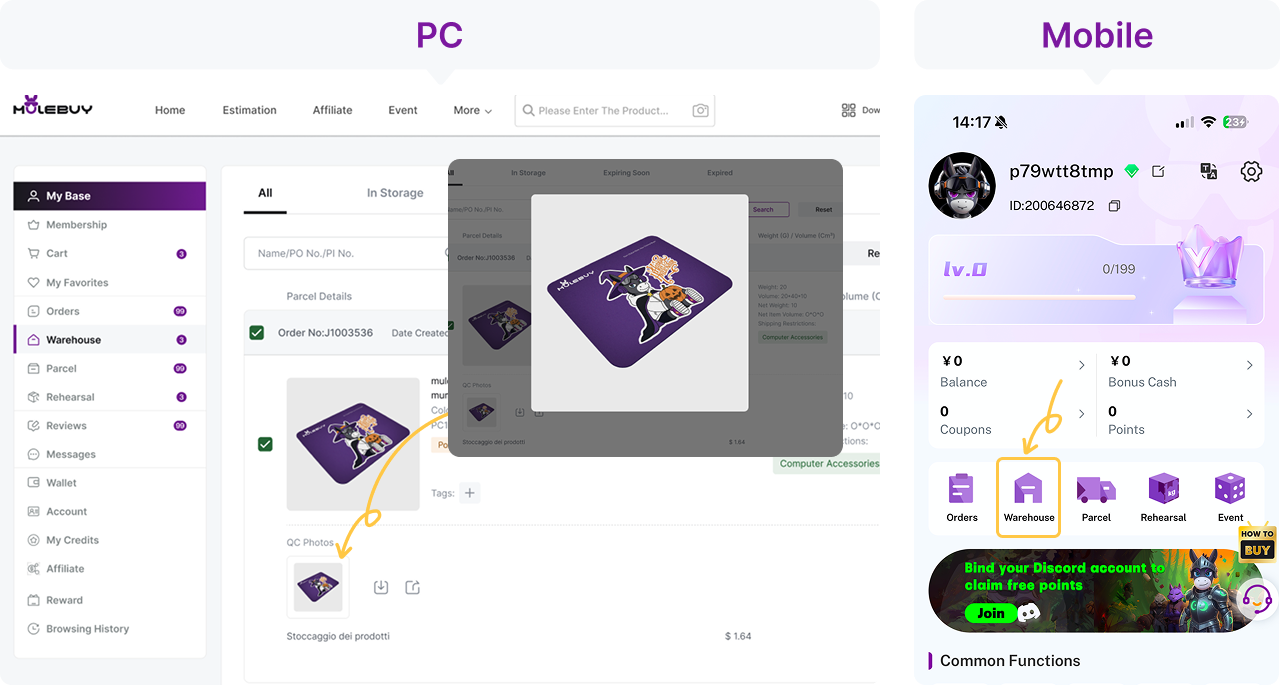
An item can be at the warehouse and still not be in your warehouse list. Mulebuy's May 2026 help pages had a page for exactly this worry: an order showing "Received" meant the seller's parcel had arrived, and the items would next be weighed and inspected; only once the status changed to "Stored" would they show on the warehouse page. The same gap exists at other agents under different names.
For the docket, this matters in two ways. First, do not count a line as landed until it is stored and photographed; a received parcel can still turn out to contain the wrong thing. Second, if a line sits at received for much longer than its neighbours, ask. A parcel that cannot be matched to your order can end up as what agents call an abnormal parcel, and those are handled under stricter rules. LoongBuy's storage page notes that it cannot send reminders about abnormal parcels, because it does not know whose they are.
What the standard photos show for one item and for several
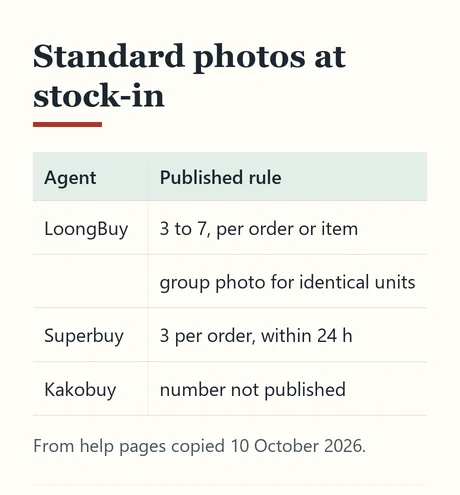
Agents promise different photo sets, and the difference matters most when one order line holds several units. Three published examples from October 2026 copies of help pages:
- LoongBuy says an eligible item normally gets three to seven standard QC photos, that this range applies to the inspected order or item as the warehouse arranges it, and that it does not mean every unit in a multi-item order gets its own set. Several identical units normally get one detailed view plus a group photo of all of them; several sizes are normally grouped by size.
- Superbuy offers three standard photos per order within a day of arrival, with the inspection covering style, quantity, colour, size and model.
- Kakobuy does not publish a number of free photos, but sells extra personalised photos and offers three free photos of the packed parcel if you tick that option when shipping.
A group photo can help count the pieces visible in that frame. It does not prove that hidden units are present or each unit is defect-free. If an individual item matters, identify its order and option and request a separate view.
How to check QC photos line by line
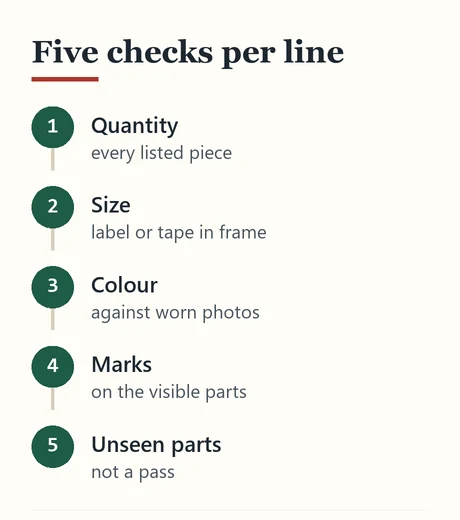
Reading QC photos is a matching exercise. Take one docket line at a time and look for five things in this order:
- Quantity. Count pieces, including straps, pouches and boxes you listed as part of the line.
- Size. Look for the size label or a tape measure in the frame. If neither is visible, the size is unconfirmed.
- Colour. Compare against the listing's worn photos, not the studio shots, and allow for warehouse lighting.
- Visible marks. Stains, pulls, scuffs and loose threads in the parts that are shown. Superbuy publishes a threshold for what its inspection reports: round marks over 0.5 cm across and other shapes over 1 cm.
- What is not shown. Inside pockets, under protective film, the far side of a folded item. Absence from a photo is not a pass.
Then mark the line: green light if it matches, red light if it needs changing, or a question if you need another photo. In haul slang that is GL and RL. Do this the same day; return and exchange windows at the warehouse stage are short, and at several agents they run from the day the item was stored.
Extra items: seller gifts and duplicate units
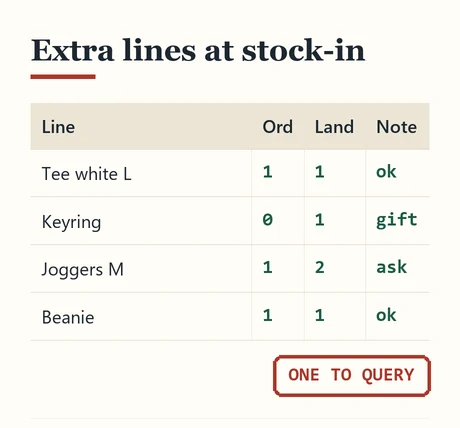
Sometimes the warehouse count is higher than the docket. The two usual reasons are a seller gift and a seller mistake. Mulebuy's May 2026 help pages had a clear rule on gifts: whatever their value, gifts from the seller belonged to you and would be packed in your parcel unless you asked otherwise or they were unsuitable for post. Gifts were not inspected, and if you had wanted a particular gift you were expected to say so in the order note; if the seller did not include it, nothing was reissued.
For the docket, give gifts their own line marked "gift" so the doorstep count does not flag them as a surprise, and so you can decide at the parcel stage whether a bulky freebie is worth its freight. A duplicate unit you did not order is different: tell the agent before the parcel is packed, because the seller may want it back, and once it has crossed a border sending it back is rarely practical.
LoongBuy's inspection page notes that gifts or accessories not shown in the listing are not verified, which matches the general rule: extras arrive, but nobody checks them for you.
Short items: when a line never arrives
If an ordered line has not landed, check whether it is still moving, partially delivered or cancelled. A cancellation is not evidence that the refund has completed: keep the actual transaction reference and status. Ask the agent which items the domestic parcel contained before changing the docket count.
Read the order status and available tracking first. A purchased item without a seller dispatch record needs a dispatch query; a courier-delivered parcel without an item record needs an intake query. For a partial order, ask whether the rest is coming or whether cancellation and a refund request are appropriate.
Decide what to do with the rest of the haul while you wait. If the missing line is small, ship without it and treat it as a separate parcel later. If it is the item the whole haul was built around, keep the others in storage, but watch the free storage clock described on the parcel count page.
Paid photos and measurements, when the free set is not enough
When a standard photo set leaves a question open, most agents sell more. The menu is broadly similar across agents, though prices differ and are not always public. LoongBuy's FAQ lists detailed photos, size measurement and video, and its inspection page says that where the order page supports it, up to three additional photos may be free. Kakobuy charges two yuan per personalised photo, delivered within a day. Superbuy charges two yuan per detailed photo, with a discount from the third.
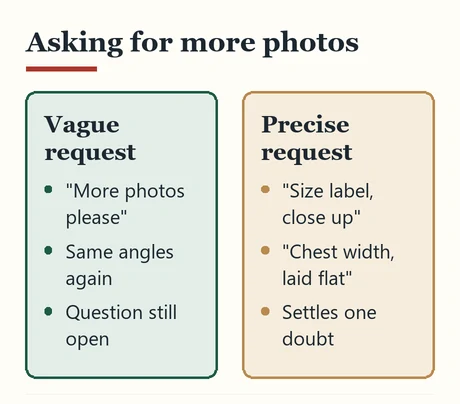
Ask for exactly what would settle the doubt: "size label, close up", "measure chest width flat", "inside of the left shoe". A vague request for "more photos" tends to produce more of the same angles.
Record what you asked for and what came back against the docket line. If a measurement settles a size question, it is also the best evidence you will have if the item turns out wrong at home.
Counting a bag, its strap and a decorative charm
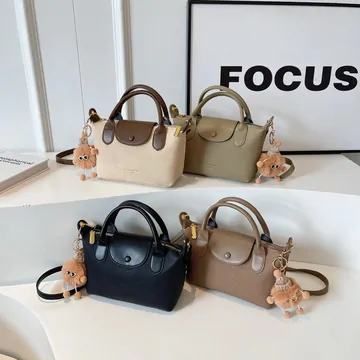
This is a group of four colour options. It does not mean one purchase includes four bags, and a charm attached for the display is not automatically a promised accessory. Write one purchased bag on the docket and list only the components confirmed in its option.
At warehouse arrival, match the chosen colour, bag and any included long strap. Keep a small accessory on the same line as its parent item so it does not disappear when packing is simplified. Ask for a spread of the included pieces if they are hidden inside the bag.
A seller gift should be recorded separately from a missing paid unit. Your count can reconcile the visible pieces, but it cannot verify inside pockets, zipper function or stitching that the photos do not show.