Haul docket tool: four counts for every line in your haul
Enter your lines once, then come back at each stage and fill in one more column. The tool flags every line where the numbers stop agreeing and says who to ask.
Build your docket
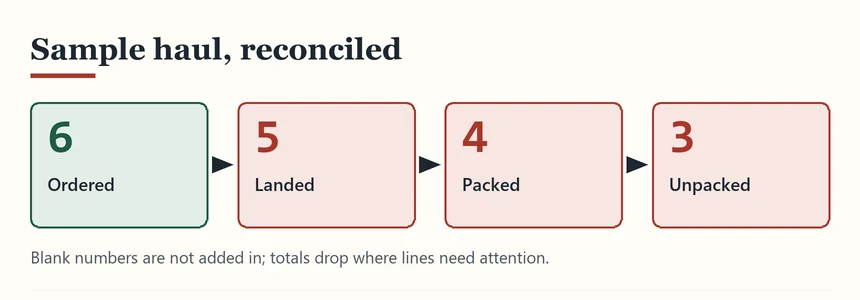
The sample haul below is loaded the first time you open the page, so you can see what a docket with problems looks like before you type your own. It has six lines: one closed, one short at the warehouse, a seller gift, one item left in storage, one missing at the door and one still on its way. Press "Reconcile the docket" after any change; "Clear all lines" starts afresh.
Your haul docket
Add one line for each item, size and colour, pick the shelf it came from, then fill in four numbers. Leave a number blank until that stage has happened. Everything stays in this browser.
| Line | Shelf | Ordered | Landed | Packed | Unpacked | Remove |
|---|
Filling in the four columns
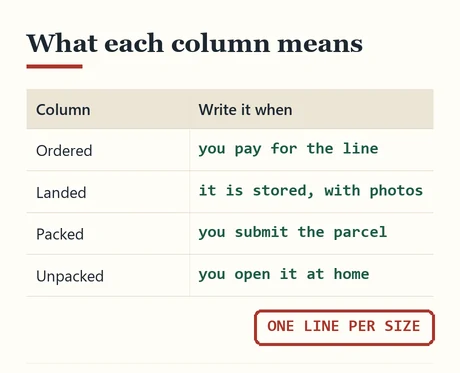
This is how to use the tool, column by column. Ordered is the quantity you paid for on that line, written when you place the order; a seller gift you did not order gets its own line with ordered set to zero. Landed is the number of pieces you can see in the warehouse photos once the line is stored, not when it is merely received. Packed is the number that went into the parcel you are submitting; for a line held back for a later parcel, write zero and the tool will remind you that it is still in storage. Unpacked is the number you found at home, after checking inside shoes and pockets.
Keep one line per size and colour. A tee ordered in M and L is two lines, because the warehouse will photograph them as two things and you will want to tick them separately.
The shelf column is there for your own sorting; it helps when a haul has many small pieces and you want to count accessories first.
Reading the result lines
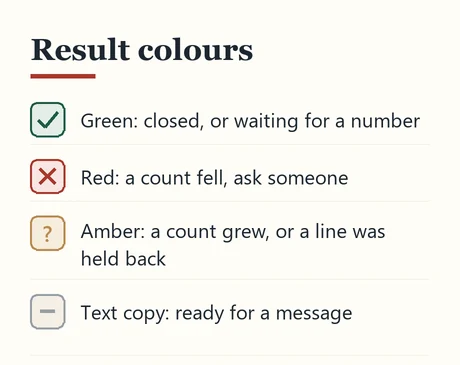
After you reconcile, the tool shows the totals for each column, a count of lines needing attention, and one result line per row. Green lines are closed or simply waiting for their next number. Red lines have a count that fell: short at the warehouse, packed more than landed, or missing at the door. Amber lines have a count that grew or a piece deliberately left behind, such as a gift or an item kept in storage for another parcel.
Each result line says what to do next in plain words. A shortfall at the warehouse points you to the agent and the seller; a shortfall at the door points you to the hiding places first and then to the agent, with the docket numbers ready to paste.
The plain-text docket under the results is written for messages. Copy the lines that matter into a ticket or an email; an agent reading "ordered 1, landed 1, packed 1, unpacked 0" does not need the rest of the story.
What the tool leaves out on purpose
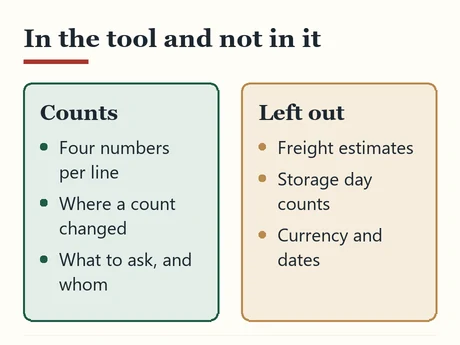
The tool counts pieces. It does not estimate freight, work out storage days, convert currency or predict delivery dates. Those figures depend on line prices and policies that change often, and a tool that quietly used last month's numbers would be worse than none. The parcel count page and the costs page explain those parts with dated sources instead.
Nothing you type is sent anywhere. The docket is saved in your browser's local storage on this device, so it survives a closed tab but not a cleared browser or a switch to another device. If you want to keep it, copy the plain-text version into a note.
No editorial mailbox is currently listed. Order, payment and parcel questions belong to the support channel of the agent holding the order.